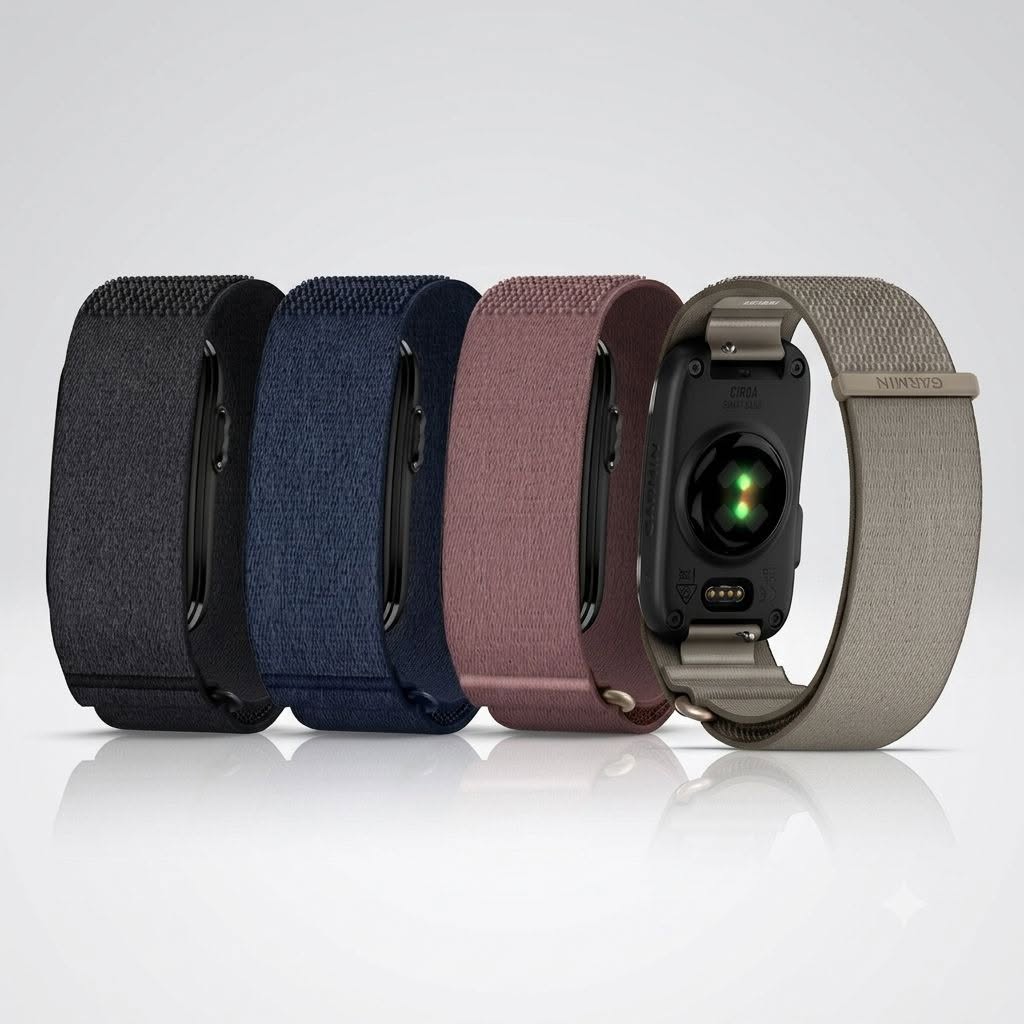
This is a quick review of all the device’s features and specifications. A full review based on real-world use, including accuracy testing, will follow later.
Garmin CIRQA is a screenless health and activity tracker designed for continuous wear. It combines the familiar Garmin health ecosystem with a simpler form factor that can be worn either on the wrist or on the upper arm.
The concept is straightforward: CIRQA collects sleep, HRV, heart rate, stress and activity data throughout the day, while a Garmin watch or Edge computer can remain the primary device for serious training.
It is closer in concept to Whoop, Polar Loop and Fitbit Air than to a conventional Garmin watch. There is no display, no built-in GPS and no on-device menu. Most interaction happens through Garmin Connect, while the band itself relies on one physical button, vibration feedback and a multicolor LED.
Design and construction
The CIRQA system consists of a removable electronic module and a fabric band. The module contains:
- an optical heart-rate sensor;
- a physical button;
- a status LED;
- a vibration motor;
- charging contacts;
- quick-release band mounts.
The electronic module is compact enough for continuous wear, although it is naturally thicker than the surrounding fabric because it contains the sensor, battery, vibration motor and charging hardware.
The physical button sits on the side of the module, making it accessible without removing the band. The optical sensor and charging contacts are positioned on the underside.
There is no screen, so the module does not constantly demand attention. It behaves more like a passive sensor than a small smartwatch.
Wrist and upper-arm wearing options
CIRQA can be worn in two locations:
- on the wrist;
- on the upper arm, above the elbow.
The same electronic module is used in both positions, but the wrist band and upper-arm band are separate straps of different lengths.
Band sizes
| Band | Size | Dimensions |
|---|---|---|
| Upper arm | S/M | 36.0 × 2.4 × 0.2 cm |
| Upper arm | L/XL | 50.0 × 2.4 × 0.2 cm |
| Wrist | S/M | 24.5 × 2.4 × 0.2 cm |
| Wrist | L/XL | 28.5 × 2.4 × 0.2 cm |
A wrist strap is therefore not intended to stretch around the biceps. To move CIRQA from the wrist to the upper arm, the module must be transferred to the longer arm band.
The straps are 24 mm wide and attach to the module using 14 mm quick-release pins. Garmin treats the wrist and arm versions as dedicated accessories and does not support generic third-party bands.
The exact retail package may depend on the selected version.
How to wear CIRQA correctly
On the wrist, CIRQA should sit above the wrist bone, similarly to a sports watch. The strap needs to be snug enough to maintain stable contact with the skin, but not tight enough to restrict circulation or leave persistent pressure marks.
On the upper arm, the band sits above the elbow. The easiest approach is to form a loop first, slide it onto the arm, bend the elbow and then adjust the hook-and-loop fastening. This accounts for the change in arm circumference when the biceps contracts.
The module is normally positioned on the outside of the arm, although it can be rotated slightly toward the inside if that improves comfort or sensor contact.
For sleep, placement matters more than it might appear. The module should not sit directly beneath the body, since pressure against the sensor can be uncomfortable and may affect optical readings. Tight sleeves can also compress or shift the band during the night.
The strap should remain clean and dry. The fabric can be machine washed after removing the electronic module.
Wearing location affects the data
Garmin Connect asks whether CIRQA is worn on the wrist or upper arm. This is not just a cosmetic profile setting.
The selected position is used when processing health and activity data, and it can also be configured separately for individual activity profiles.
There are a few functional differences between the two positions.
For example, obtaining a VO2 max estimate requires wrist-based heart-rate data during a timed brisk walk or run. Wrist placement is also recommended in wheelchair mode.
In practice, the upper-arm position makes sense for users who dislike wearing devices on the wrist, want to keep a mechanical watch on, or prefer a more stable optical signal during exercise. The wrist remains the more universal option for everyday metrics and specific Garmin algorithms.
How Garmin CIRQA is controlled
Most settings are managed through Garmin Connect. The band itself has no menus and no touch interface.
The physical button handles the functions that need to be available without reaching for a phone.
Start and stop an activity
A favorite activity type can be selected in Garmin Connect. One press starts recording, followed by vibration feedback and a flashing green LED. Pressing the button again ends the activity.
The completed session appears in Garmin Connect after synchronization.
Only one favorite activity can be launched directly from the button. Other sport profiles must be started through the app.
Pairing mode
Bluetooth pairing can be activated in two ways:
- three quick button presses;
- holding the button for approximately six seconds.
The LED flashes purple while the module is in pairing mode.
Heart-rate broadcasting
When device control is enabled, holding the button for around three seconds starts or stops heart-rate broadcasting.
This allows CIRQA to act as an external optical heart-rate sensor for compatible Garmin devices, including an Edge cycling computer. The LED flashes orange while broadcasting.
Alarm controls
When the vibration alarm is active:
- a short button press snoozes it;
- holding the button stops it.
Find My Band
Garmin Connect can make the band vibrate when it is nearby. Pressing the button stops the vibration. If the band is out of range, the app can show the last connection time and last known phone-based location.
Battery check
A double tap on the top of the module shows the approximate battery state through the LED. This gesture must first be enabled in the Power Manager settings.
LED meanings
The LED replaces almost all on-device visual information.
| LED behavior | Meaning |
|---|---|
| Flashing purple | pairing mode |
| Flashing green | activity recording |
| Solid green during an activity | activity paused |
| Flashing red during an activity | activity stopped and waiting to be saved, resumed or discarded |
| Flashing orange | heart-rate broadcasting |
| Flashing white | startup or reboot |
| Flashing all colors | unpaired module starting |
| Alternating green and orange | software update |
| Flashing red | pairing failure or system error |
| Alternating green, yellow and red | factory reset |
For battery status:
- green means fully charged;
- orange means low battery;
- red means critically low battery;
- flashing green means charging.
Activity recording
CIRQA supports a surprisingly broad range of activity profiles, including:
- running;
- trail running;
- treadmill;
- road cycling;
- gravel cycling;
- mountain biking;
- indoor cycling;
- strength training;
- HIIT;
- rowing;
- swimming;
- hiking;
- skiing;
- tennis;
- padel;
- yoga;
- Pilates;
- meditation and breathwork.
There are also profiles for team sports, racket sports, winter sports and water sports.
The long list should not be confused with full smartwatch functionality. CIRQA records the activity, heart rate and related metrics, but it does not display live fields on the wrist.
No built-in GPS
CIRQA uses the connected phone for GPS data.
For outdoor activities, Garmin Connect can provide:
- route;
- speed;
- pace;
- distance;
- location.
Phone GPS can be enabled or disabled for each activity profile. Without the phone, CIRQA can still record duration, heart rate and activity load, but there will be no independent GPS track.
This makes the device suitable for passive activity logging, but it is not a replacement for an Edge or GPS watch during structured outdoor training.
Activity controls are limited without the phone
Starting and stopping the favorite activity from the button is convenient, but more advanced controls remain in Garmin Connect.
The app can be used to:
- select another activity type;
- pause the recording;
- resume it;
- save or discard it;
- mark a lap;
- view live data.
There is no practical way to manage intervals or browse workout fields directly from the band.
Automatic activity detection
CIRQA can automatically recognize activities using motion, exertion, account history and, when permitted, phone location data.
Automatically detected sessions are uploaded to Garmin Connect, where they can be edited or removed.
For casual walks and everyday movement, this reduces the need to start every session manually. For important workouts, the physical button remains preferable because it establishes clear start and stop points.
Structured workouts
CIRQA can follow structured workouts through Garmin Connect, but the phone becomes the display.
The app shows:
- the current workout step;
- duration or target;
- instructions;
- live workout data.
This feature requires Garmin Connect+.
The setup works reasonably well for indoor training, strength sessions and treadmill workouts, where the phone can remain visible. It is less convenient for running or cycling than using a Garmin watch or Edge.
Daily health tracking
CIRQA records the core metrics expected from a modern Garmin wearable:
- continuous heart rate;
- resting heart rate;
- heart-rate variability;
- HRV Status;
- stress;
- respiration;
- steps;
- distance;
- calories;
- intensity minutes;
- sleep;
- Pulse Ox;
- daily and recorded activities.
These measurements feed into Garmin’s higher-level recovery and fitness metrics.
Body Battery
Body Battery combines HRV, stress, sleep quality and physical activity to estimate the user’s remaining energy on a scale from 5 to 100.
Sleep and restful periods recharge the score, while exercise and sustained stress drain it.
This is one of CIRQA’s strongest features. A screenless band is particularly well suited to Body Battery because the metric becomes more useful when the device is worn continuously rather than only during workouts.
HRV Status
CIRQA records overnight HRV and calculates a seven-day average.
The value is interpreted against the user’s personal baseline, making it more useful than comparing isolated nightly readings. Long-term deviations can help identify unusual fatigue, illness, accumulated training stress or poor recovery.
For Garmin users who already rely on HRV Status, CIRQA can maintain continuity on days when a sports watch is not being worn.
Stress and respiration
The band estimates stress throughout the day using heart-rate and HRV data. It also records respiration during sleep and wakefulness.
Stress readings may be unavailable during active movement because the algorithm requires a sufficiently stable signal.
Sleep tracking
CIRQA automatically detects sleep within the configured sleep schedule.
It records:
- total sleep time;
- sleep stages;
- sleep movement;
- Sleep Score;
- overnight HRV;
- respiration;
- overnight breathing variations.
Sleep Coach uses sleep history, activity, circadian rhythm and HRV Status to calculate a personalized sleep recommendation.
A fabric strap and lack of a display suit nighttime use well. The main practical consideration is module placement, since sleeping directly on top of the sensor housing can be uncomfortable.
Smart Wake and vibration alarms
CIRQA includes a vibration alarm configured through Garmin Connect.
Two features make it more useful than a basic fixed alarm.
Smart Wake
Smart Wake can trigger a gentle vibration during the 30-minute period before the selected alarm time, based on sleep timing.
For an alarm set to 8:00, the band may begin waking the user at some point between 7:30 and 8:00. The final alarm still activates at the scheduled time if necessary.
Quiet Start
Quiet Start begins with a softer vibration and gradually increases intensity.
This makes the alarm less abrupt and reduces the chance of waking someone sleeping nearby.
Pulse Ox
Pulse Ox can operate in three modes:
- all day;
- during sleep;
- off.
All-day monitoring uses more battery. Sleep-only monitoring is likely to be the more sensible setting for most users.
Pressure on the sensor or unusual sleep positions can produce abnormally low overnight readings, so isolated SpO2 values should be interpreted cautiously.
VO2 max and Fitness Age
CIRQA can calculate VO2 max after at least 15 minutes of brisk walking or running with wrist-based heart-rate data.
The estimate updates after qualifying activities.
Cycling VO2 max is better handled by a Garmin watch or Edge used with a power meter.
Fitness Age uses factors such as:
- age;
- body mass index or body-fat percentage;
- resting heart rate;
- vigorous activity history.
Heart-rate broadcasting
CIRQA can transmit live heart-rate data to compatible Garmin devices.
For cyclists, this means the band can provide heart rate to an Edge without requiring a watch. It can also be worn on the upper arm, which may provide more stable optical readings than the wrist in some situations.
It remains an optical sensor, however. For hard intervals, sprinting or rapidly changing intensity, an ECG chest strap will generally respond faster and more consistently.
Broadcasting also reduces battery life.
Health alerts
CIRQA can vibrate for several health and system events:
- high heart rate;
- low heart rate;
- approaching bedtime;
- step goal;
- weekly intensity-minute goal;
- VO2 max change;
- Fitness Age change;
- low battery;
- full charge.
Abnormal heart-rate alerts activate only after at least ten minutes of inactivity. The alert appears on the phone and the band vibrates. It is a wellness feature, not a medical diagnostic tool.
LiveTrack and safety features
LiveTrack allows selected contacts to follow an outdoor activity in real time through a web page.
It requires:
- a connected phone;
- Bluetooth;
- mobile data;
- network coverage.
LiveTrack can start manually or automatically when an outdoor activity begins.
CIRQA itself is not an independent emergency communication device. Safety functions depend on the paired phone.
Integration with Garmin watches and Edge
The best CIRQA use case is alongside another Garmin device.
Garmin Connect allows users to assign separate roles:
- Primary Wearable for sleep, steps and daily health metrics;
- Primary Training Device for Training Status, load and sport-specific metrics.
A practical setup would be:
- CIRQA worn throughout the day and night;
- a Garmin watch or Edge used during structured workouts;
- CIRQA selected as Primary Wearable;
- the watch selected as Primary Training Device.
This keeps sleep, HRV, stress and Body Battery continuous without sacrificing maps, GPS, power data or live workout screens during training.
Battery life and charging
CIRQA is rated for up to 10 days of battery life.
It uses a built-in rechargeable lithium-ion battery. A full charge takes up to 90 minutes.
The LED flashes green while charging and remains solid green when charging is complete.
Charging uses a proprietary Garmin contact cable rather than a USB-C port directly on the module.
Real-world battery life will depend on enabled features. The main battery-heavy settings are:
- all-day Pulse Ox;
- prolonged heart-rate broadcasting;
- frequent activity recording;
- connected GPS sessions.
The ten-day figure should be treated as the upper end of normal everyday use rather than a guarantee with every sensor enabled continuously.
Battery Saver
Battery Saver significantly reduces functionality.
It:
- lowers LED brightness;
- disables heart rate;
- disables Pulse Ox;
- disables automatic activity detection;
- prevents activity recording from being started.
This is better viewed as an emergency mode for extending the remaining charge, not a normal configuration.
Water resistance and cleaning
CIRQA has a 5 ATM water-resistance rating and includes a swimming activity profile.
The fabric band can be machine washed after removing the electronic module.
Recommended care:
- close the hook-and-loop fasteners;
- use a washing bag;
- select a gentle cycle;
- keep the water temperature at or below 40°C;
- avoid bleach and fabric softener;
- air dry the strap.
The electronic module should not be placed in a washing machine or dryer.
Operating temperatures
CIRQA operates between:
- −20°C and 60°C.
Charging is supported between:
- 0°C and 45°C.
Garmin Connect and Connect+
The core health features work without a paid subscription:
- heart rate;
- HRV;
- HRV Status;
- sleep;
- Sleep Score;
- Body Battery;
- stress;
- steps;
- Pulse Ox;
- standard activity recording;
- heart-rate broadcasting;
- basic Garmin Connect analysis.
Garmin Connect+ is used for additional features such as:
- structured workouts displayed on the phone;
- Live Activity Stats;
- expanded indoor activity viewing;
- additional Garmin Coach guidance;
- Active Intelligence;
- nutrition logging;
- advanced dashboards;
- LiveTrack+.
Some activity-related functionality may also depend on Connect+, but the core CIRQA experience does not revolve around a subscription.
What CIRQA does not replace
CIRQA does not replace a full Garmin sports watch or Edge computer.
It lacks:
- a display;
- built-in GPS;
- maps;
- Garmin Pay;
- music;
- Wi-Fi;
- a speaker;
- a microphone;
- ECG;
- on-device workout screens;
- full activity controls from the band.
That is not necessarily a weakness. CIRQA is designed around continuous data collection rather than interaction.
First review verdict
Garmin CIRQA makes the most sense as a screenless companion for the Garmin ecosystem, not as a standalone sports device.
Its strongest features are:
- Body Battery;
- HRV Status;
- continuous sleep tracking;
- Sleep Coach;
- Smart Wake;
- up to 10 days of battery life;
- upper-arm and wrist wearing options;
- physical activity button;
- heart-rate broadcasting;
- 5 ATM water resistance;
- Primary Wearable integration.
Its main limitations are:
- reliance on Garmin Connect;
- no built-in GPS;
- limited control from the band;
- separate wrist and upper-arm straps;
- proprietary charging;
- no support for ordinary third-party bands;
- some advanced functions behind Connect+.
The most compelling scenario is simple: wear CIRQA continuously for sleep, HRV, stress and Body Battery, then use a Garmin watch or Edge when a workout requires GPS, maps, power data or structured training guidance.
That gives CIRQA a clear purpose. It fills the gap between Garmin’s comprehensive health metrics and the reality that many users do not want to wear a conventional sports watch 24 hours a day.

This is interesting, but the information turned out to be accurate. How did you get it before the official announcement?
This topic is simply matchless :), it is interesting to me.