On October 20, 2026, Garmin introduced the Edge 1060, the latest generation of its flagship cycling computer. At first glance, the update doesn’t look particularly revolutionary: the same 3.5-inch LCD display with a resolution of 480 × 800, up to 20 hours of battery life, and the familiar set of training metrics.
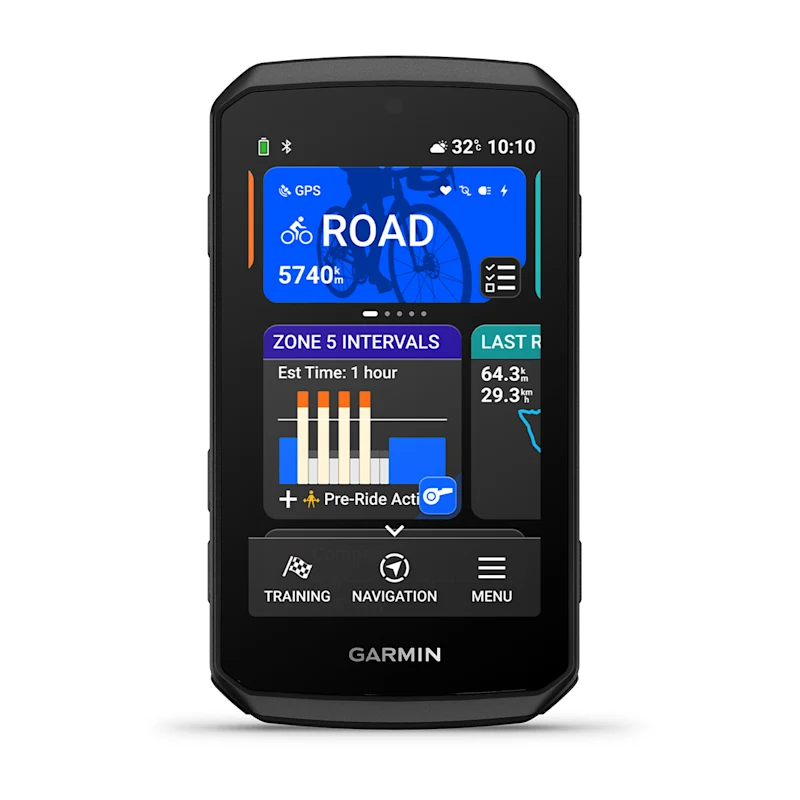
However, Garmin has significantly changed how riders interact with the device. The Edge 1060 introduces comprehensive voice controls, seven physical buttons, improved navigation, and several interesting additions for training and group rides.
It’s also 11.5 mm shorter and 19 g lighter than its predecessor, the Edge 1050.
Personally, I think Garmin should have called this the Edge 1050+, not the Edge 1060. The improvements are welcome, but they feel more like a refinement of the previous generation than an entirely new product.
Let’s look at the most interesting features, what’s actually changed compared to the Edge 1050 and 1040, and whether upgrading makes sense.
1. Voice Control Is More Capable Than You Might Expect
The Edge 1060 features a built-in microphone and voice control system that can be activated by saying “OK Garmin”or holding a button.
And it’s not just about switching between data screens. The cycling computer recognizes a surprisingly wide range of commands.
During a workout, you can:
- Ask for your current heart rate, power, cadence, or speed.
- Skip to the next or previous workout interval.
- Pause a workout or repeat the current interval.
- Switch data screens, open ClimbPro, or display the map.
- Start power meter calibration.
Navigation commands are even more interesting:
Find a coffee shop on my route
Find a coffee shop along your current route.Take me to the start
Navigate back to your starting point.How far is the next course point?
Check the distance to the next course point.Are there hazards on the road?
Check for upcoming road hazards.Zoom in
Zoom in on the map.
You can even control a smart trainer. Voice commands allow you to adjust target power, resistance, or simulated gradient on a compatible trainer.
Another feature lets you control Garmin Varia cameras. For example, you can take a photo or save a video clip using your voice.
Garmin says the system understands natural language variations, so you don’t necessarily have to memorize exact phrases. However, this is not a general-purpose AI assistant. It recognizes commands within a supported set of functions.
The biggest question is how well voice recognition works while cycling. At 30-35 km/h, especially into a headwind, microphone performance could be less reliable. Voice commands are also not available in every language.
How Does This Compare to the Edge 1050?
The Edge 1050 already introduced a built-in speaker for audible navigation instructions, alerts, and the virtual bike bell.
However, it doesn’t have a microphone or voice control.
This is one of the most significant differences between the Edge 1060 and its predecessor.
2. Seven Physical Buttons Instead of Three. But Are They Programmable?
The Edge 1040 and 1050 had three physical buttons. The Edge 1060 has seven.
You now get dedicated hardware controls for:
- Moving up and down through menus and data screens.
- Selecting menu items.
- Going back to the previous screen.
- Starting and stopping activity recording.
- Marking laps or advancing to the next workout interval.
- Powering on and locking the device.
Some buttons also perform additional actions when held down, such as opening menus, accessing widgets, or activating voice control.
This is more important than it might initially seem.
Touchscreens are convenient for maps and settings, but they’re not always ideal while riding. Rain, wet gloves, rough roads, and high speeds make physical buttons much more practical.
On the Edge 1060, you can perform many common actions without touching the display.
Can you remap the buttons?
At launch, Garmin does not advertise arbitrary customization of the Edge 1060’s physical buttons. Each button has a predefined function and, in some cases, a secondary long-press action.
For example, there’s no documented built-in option to assign a physical button to open the map, activate the virtual bell, or launch a particular app.
However, the Edge does support programmable buttons on compatible electronic shifting systems. You can assign actions to those buttons, including activating the OK Garmin voice command feature.
You can also customize certain on-screen quick-action buttons, such as those used for controlling Varia cameras. That’s different from remapping the physical buttons on the Edge itself.
In other words, the main advantage of having seven buttons is more convenient operation without relying on the touchscreen, rather than extensive customization.
3. Navigation Now Offers Alternative Routes
One of the most useful improvements involves calculating routes directly on the device.
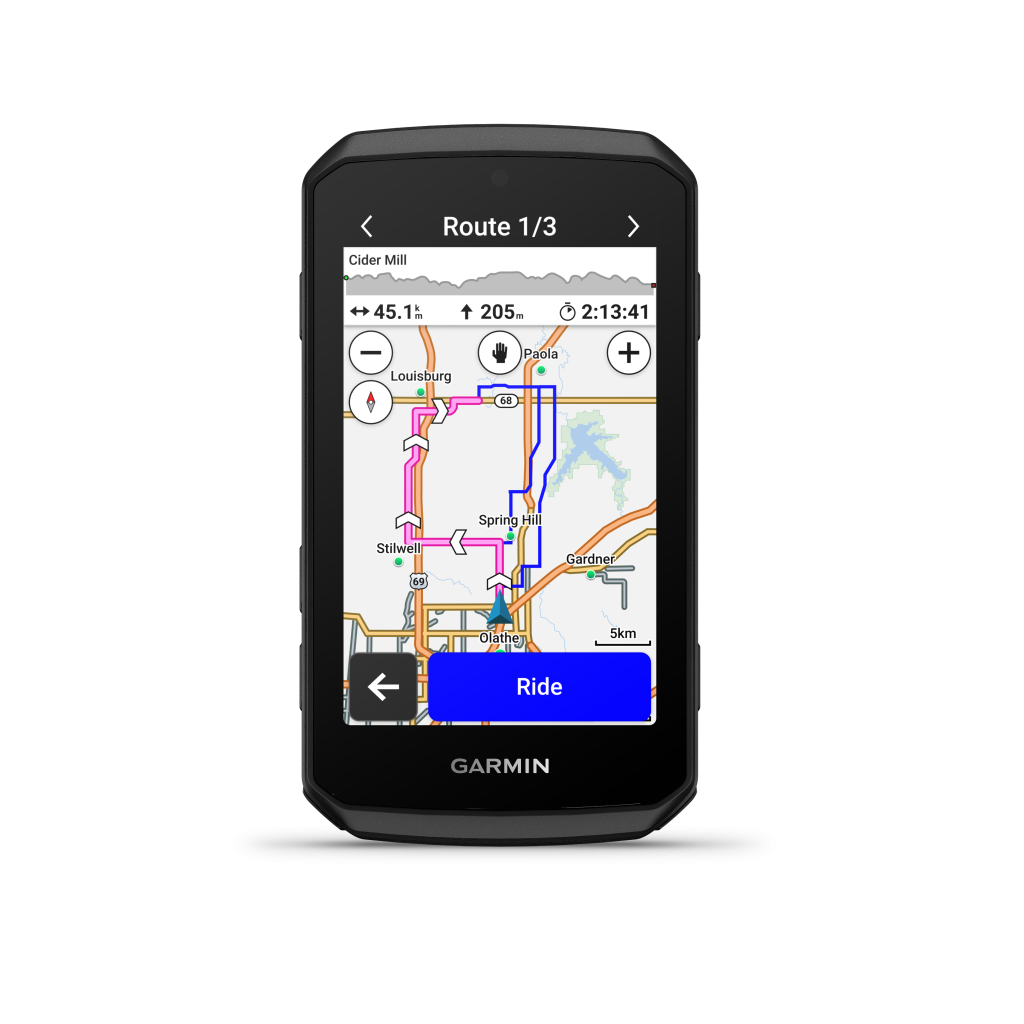
When selecting a destination, the Edge 1060 can calculate multiple route options and display them in different colors on the map. You can choose your preferred route before starting navigation.
The alternatives can be evaluated based on estimated travel time, elevation gain, and cycling activity type.
Garmin has also introduced Route Previews, allowing riders to review distance, estimated travel time, traffic conditions, and known hazards before setting off.
Even more interesting is Free Flow Routing.
Rather than optimizing routes solely based on distance and road type, the new routing approach also considers potential interruptions. Garmin aims to favor roads with fewer intersections, stops, and sections where cyclists are forced to slow down repeatedly.
For road cycling workouts, this could be much more useful than simply finding the shortest route.
Garmin has also improved Up Ahead. You can select categories of points of interest, such as cafes, restrooms, or gas stations, and see relevant locations along your route.
What’s Different from the Edge 1050?
The Edge 1050 already supported route calculation, off-course recalculation, and popularity-based cycling routes.
The main improvements in the Edge 1060 are alternative route selection with additional criteria, route previews, and the new Free Flow Routing algorithm.
How effectively these features work on real roads, especially in cities with numerous traffic lights, remains to be seen.
4. More Detailed Road Hazard Warnings
Garmin continues to expand its community-based road hazard reporting system.
Cyclists can report potholes, fallen trees, animals on the road, and road closures. Other Garmin users can receive warnings about these hazards.
An interesting detail is that the Edge 1060 allows you to indicate the direction of a road closure directly on the map.
Hazard reports can be confirmed or marked as no longer relevant. Reports also expire over time.
There are separate warning settings for railroad crossings, sharp bends, high-traffic roads, and unpaved sections.
You can also report hazards using voice commands, such as Report a pothole.
It’s worth noting that the basic road hazard reporting system was introduced with the Edge 1050 and subsequently became available on the 1040 through software updates.
The Edge 1060 improves the experience with additional warnings and the ability to submit reports without taking your hands off the handlebars.
5. GroupRide Can Automatically Discover Nearby Rides
Garmin’s GroupRide features already let cyclists share courses, track other participants, and exchange messages.
The Edge 1060 introduces a more convenient way to discover nearby group rides.
With Discover Nearby Rides, the device can notify you about active GroupRide sessions nearby and offer to join them.
It also supports automatically sharing GroupRide codes between compatible Garmin devices at close range.
This eliminates the need to manually exchange six-digit codes.
During a ride, the Edge displays other cyclists’ locations, directions of travel, and connection status.
The nearby rider list refreshes every 15 seconds. By default, it displays the 25 closest riders within a 40 km radius, although more distant participants can also be displayed.
What Was Available Before?
GroupRide already works on the Edge 1040 and 1050. Riders can share routes, messages, and locations, as well as participate in group competitions.
The main improvements in the Edge 1060 are discovering active nearby rides and simplifying the process of joining them.
Online GroupRide features require a paired smartphone running Garmin Connect.
6. A Better Interface for Structured Workouts
Garmin has redesigned the structured workout screen.
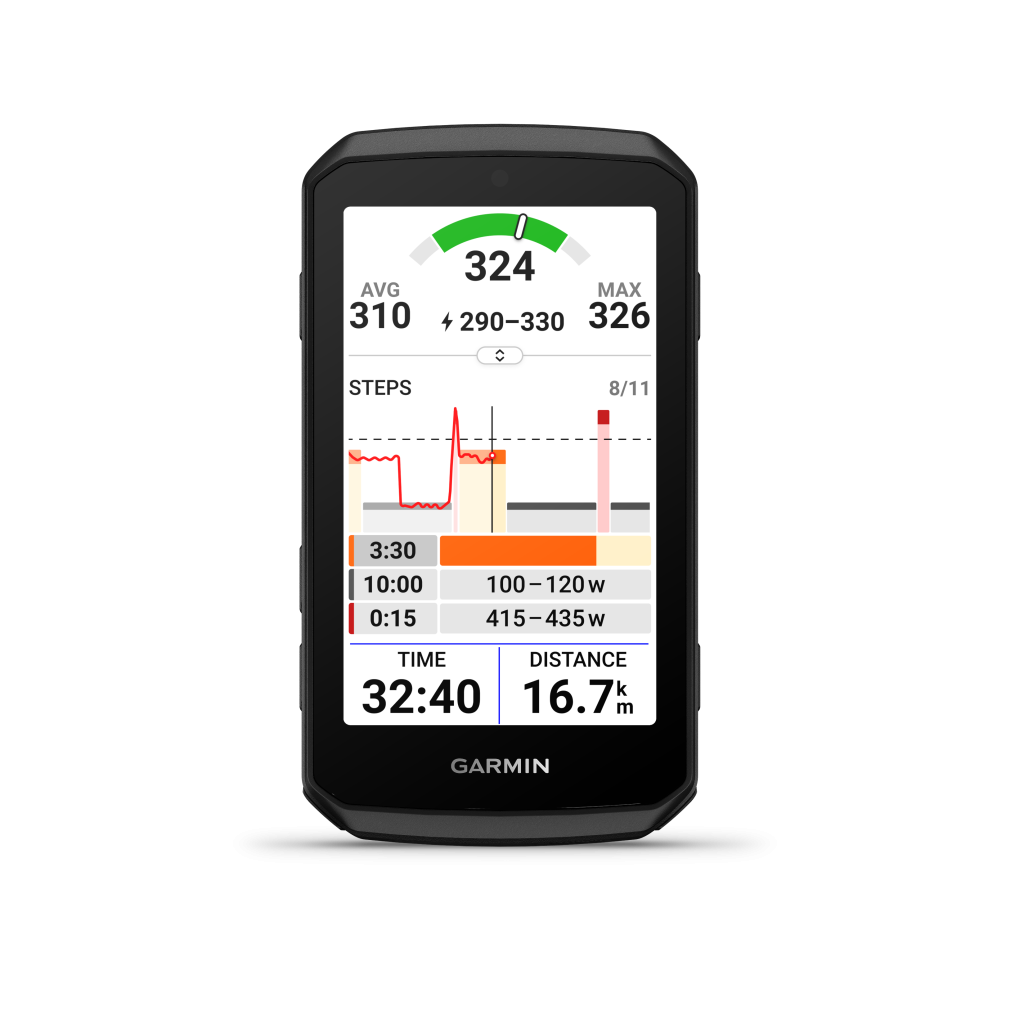
You can now see a graph of target and actual power, the current interval, and upcoming workout steps on a single screen. The graph can be zoomed in for a more detailed view.
This is particularly useful for complex workouts involving multiple interval blocks at different intensities.
The Edge also supports secondary workout targets. For example, you can maintain a specified power output while simultaneously targeting a particular cadence.
After completing a workout, the device calculates a Workout Execution Score, evaluating how closely you followed the prescribed intervals.
The score itself, along with secondary workout targets, was already available on previous Edge devices. The improvement here is primarily in the user interface.
Another interesting feature is the ability to customize Daily Suggested Workouts by specifying preferred training days and long-ride days. This allows Garmin to better account for your weekly schedule when generating recommendations.
The Edge 1050 already supports structured workouts, Garmin Coach, Power Guide, and Workout Execution Score. Therefore, 1050 owners shouldn’t expect fundamentally new training metrics from the 1060.
7. A Pre-Ride Checklist
A small but practical improvement: the Edge 1060 can display a pre-ride checklist before starting an activity.
It lets you check connected sensors, review equipment status, and calibrate your power meter.
This helps avoid the familiar situation where you discover 20 minutes into a ride that your power meter never connected or wasn’t calibrated.
The checklist is available directly before starting activity recording.
This is more of a usability improvement than a compelling reason to replace an existing cycling computer.
8. Advanced Garmin Varia Radar Features
The Edge 1060 supports a dedicated data screen for compatible Garmin Varia RearVue radars.
It displays approaching vehicles, their relative positions, and their estimated threat levels.
Depending on the radar’s capabilities, the system can consider vehicle size, closing speed, and other factors. Alerts are differentiated by threat level.
You can also add up to five customizable data fields to the radar screen, such as speed, power, or heart rate.
One important detail: many advanced radar features are already available on the Edge 1040 with current software and on the Edge 1050.
This is an advantage of Garmin’s broader ecosystem, not an exclusive Edge 1060 feature.
9. Timing Gates and 5 Hz GPS Recording
The Edge 1060 includes several interesting features for more specialized training scenarios.
Timing Gates
You can create a series of virtual timing gates and ride through them on repeated laps.
The Edge automatically records split times and compares them with your fastest previous run. Each series supports up to ten additional timing gates.
This can be useful for repeated efforts on a short course, technical training sections, or comparing multiple attempts.
5 Hz GPS Recording
Normal GPS recording typically captures one position per second.
The Edge 1060 supports recording GPS positions five times per second, providing more detailed trajectory data.
However, there’s an important limitation: this mode is intended for descents in Enduro MTB and Downhill MTB activity profiles.
The higher recording frequency helps analyze cornering lines and technical downhill sections more accurately.
For regular road cycling or gravel riding, it offers little practical benefit.
Both Timing Gates and 5 Hz GPS recording were already available on the Edge 1050, so neither is exclusive to the 1060.
10. Charging: Could the Edge 1060 Actually Be More Convenient?
This is an important question for long-distance cyclists, particularly given the reduced battery life compared to the Edge 1040.
The Edge 1060 supports external power while riding, including through compatible Garmin external power accessories.
However, there’s an interesting design change that could make charging from a regular power bank more convenient, depending on future mounting solutions.
Charging the Edge 1050 Wasn’t Convenient Either
On the Edge 1050, the USB-C charging port is located on the bottom edge of the device.
That sounds like a reasonable location, but in practice, it’s not particularly convenient when the computer is installed on an out-front mount.
The USB-C connector points toward the handlebars, leaving very little clearance. Depending on the mount, a straight connector can run directly into the handlebar, making it difficult or impossible to connect a cable while the device is mounted.
So it’s not as if the Edge 1050 offered a particularly good solution for charging from a regular power bank during a ride.
The Edge 1060 Could Actually Improve This
On the Edge 1060, Garmin has moved the USB-C port to the rear of the device, close to the mounting interface.
At first glance, this might seem like an even worse location.
But there’s an interesting possibility.
The new port position could allow third-party manufacturers to develop mounts that provide access to USB-C from underneath, with the cable connector fitting between the mounting arms.
Instead of having a USB-C connector protruding toward the handlebars, a purpose-designed mount could provide clearance for the connector to enter the port from below.
This could result in a much cleaner charging setup for long-distance riding.
Of course, this is currently a possibility rather than a confirmed accessory solution. We’ll need to see what mount manufacturers actually produce and whether the available space is sufficient.
Still, I wouldn’t automatically consider the new USB-C location a disadvantage. It might actually be an improvement over the Edge 1050, provided suitable mounts become available.
What About Garmin Power Mount?
The Edge 1060 retains electrical contacts on the back for compatible external power accessories.
This provides an alternative way to supply power during long rides without connecting a USB-C cable directly to the device.
Similar external power solutions were available for the Edge 1040 and 1050.
The main advantage is avoiding the clearance issues associated with standard USB-C connectors.
And Reverse Charging?
The Edge 1060 also introduces Reverse Charging.
This means the cycling computer can act as a power source for other devices. For example, you could charge a Garmin Varia light, a phone, or another compatible accessory through USB-C.
There are two limitations.
First, reverse charging can significantly reduce the Edge’s own battery life.
Second, Garmin states that reverse charging is not intended for use while riding.
This restriction applies to charging other devices from the Edge 1060, not to powering the Edge itself from an external source.
The distinction is important:
- Charging the Edge 1060 from an external power source during a ride is supported through compatible external power accessories.
- Charging the Edge through its USB-C port while mounted depends on physical clearance and the mounting solution.
- Charging other devices from the Edge 1060 is primarily intended for use while stopped.
For endurance cyclists, the new USB-C placement could turn out to be a positive change, but that will depend on how accessory manufacturers respond.
11. A Few More Useful Features
Virtual Bike Bell. Double-tapping a data screen produces an audible bell sound to alert pedestrians or other cyclists. This feature first appeared on the Edge 1050.
Garmin Pay. The cycling computer supports contactless payments. Payment cards can be configured through Garmin Connect. This was already available on the 1050 but not the 1040.
Garmin Messenger. You can send and listen to voice messages and reply to text messages through a paired smartphone. The Edge 1060’s built-in microphone makes voice messaging and hands-free commands more practical.
Music Controls. The Edge can control music playback on a connected smartphone. The 1060 adds voice commands for these actions.
Customizable Home Screen. Garmin has expanded how apps and widgets can be organized, making frequently used features easier to access.
Garmin Edge 1040 vs. 1050 vs. 1060: Full Comparison
| Feature | Edge 1040 | Edge 1050 | Edge 1060 |
|---|---|---|---|
| Release year | 2022 | 2024 | 2026 |
| Display | 3.5″ TFT | 3.5″ LCD | 3.5″ LCD |
| Resolution | 282 × 470 | 480 × 800 | 480 × 800 |
| Dimensions | 117.6 × 59.3 × 20 mm | 118.5 × 60.2 × 16.3 mm | 107 × 58.5 × 16.3 mm |
| Weight | 126 g | 161 g | 142 g |
| Physical buttons | 3 | 3 | 7 |
| Customizable device buttons | No | No | Not advertised |
| Battery life | Up to 35 hours | Up to 20 hours | Up to 20 hours |
| Battery saver mode | Up to 70 hours | Up to 60 hours | Up to 60 hours |
| Storage | 32 GB | 64 GB | 64 GB |
| Multi-band GNSS | Yes | Yes | Yes |
| Built-in speaker | No | Yes | Yes |
| Microphone | No | No | Yes |
| Voice commands | No | No | Yes |
| Virtual bike bell | No | Yes | Yes |
| Garmin Pay | No | Yes | Yes |
| GroupRide | Yes | Yes | Yes, with nearby discovery |
| Free Flow Routing | No | No | Yes |
| USB-C reverse charging | No | No | Yes |
| External power during rides | Yes | Yes | Yes |
| Stamina / Power Guide / ClimbPro | Yes | Yes | Yes |
Battery life figures are Garmin’s published estimates and depend on display brightness, satellite settings, connected sensors, and usage. The Edge 1040 figures refer to the standard non-Solar model.
Edge 1040 vs. Edge 1060
The upgrade from the Edge 1040 to the Edge 1060 is the most noticeable.
The main improvements are a much sharper and more contrast-rich display, a smaller enclosure, additional physical controls, a speaker, voice commands, and more advanced navigation features.
However, there’s a significant trade-off in battery life.
The Edge 1040 offers up to 35 hours compared to just 20 hours on the Edge 1060. The 1040’s transflective display also works particularly well in bright sunlight without requiring high backlight brightness.
For cyclists who primarily use their computers to monitor power, heart rate, and distance, the Edge 1040 remains perfectly capable.
But for riders who frequently interact with maps, search for destinations, and navigate complex routes, the Edge 1060 could provide a substantially better experience.
Edge 1050 vs. Edge 1060
This comparison is much less straightforward.
The Edge 1050 already has a high-resolution LCD display, built-in speaker, Garmin Pay, virtual bike bell, and almost the entire Garmin training analytics suite.
The Edge 1060 retains the same display size, resolution, and advertised battery life.
Its main advantages are:
- A body that’s 11.5 mm shorter and 19 g lighter.
- Seven physical buttons instead of three.
- A microphone and voice control.
- Improved navigation and routing.
- Updated workout and GroupRide interfaces.
- USB-C reverse charging.
- A redesigned USB-C port location that could enable better charging solutions with compatible mounts.
For existing Edge 1050 owners, these improvements may not justify replacing a perfectly functional device.
That’s particularly true if voice control isn’t something they expect to use regularly.
Is the Garmin Edge 1060 Worth Buying?
The Edge 1060 is an interesting update, although not a revolutionary one.
If we look strictly at training capabilities, the differences from previous generations are relatively minor.
Stamina, FTP, Training Status, Power Guide, ClimbPro, Cycling Ability, and the other major performance metrics already exist on the Edge 1040 and 1050.
What Garmin has really improved is the user experience.
The smaller body, seven physical buttons, voice commands, and more flexible navigation address genuine usability problems.
For Edge 1040 owners, upgrading to the 1060 could make sense primarily for the display, navigation, and physical controls.
For Edge 1050 owners, the argument is much weaker. Most of the hardware capabilities and nearly all the training analytics remain unchanged.
If you’re buying a new flagship cycling computer today, the Edge 1060 is clearly the more attractive option. But replacing an existing 1050 is harder to justify unless the new features are particularly valuable to you.
We still need independent testing of interface performance, voice recognition in windy conditions, and real-world battery life.
It will also be interesting to see whether accessory manufacturers take advantage of the relocated USB-C port to develop better charging-compatible mounts.
These practical details will ultimately determine how successful the Edge 1060 really is.
My Take: Garmin Should Have Called It the Edge 1050+
In my opinion, the Garmin Edge 1060 is exactly the kind of product that should have been released as an Edge 1050+, not as a completely new generation.
I actually like several of the changes. The smaller body is welcome, the additional physical buttons address a real usability issue, and voice control could become genuinely useful if it works reliably on the road.
But let’s look at the bigger picture.
The Edge 1060 has the same display size and resolution as the 1050. Battery life hasn’t improved. The core training metrics are essentially unchanged.
There is no major new performance metric, no dramatic improvement in endurance, and no fundamental change in what the computer can do for your training.
What we get instead is a collection of sensible refinements: better ergonomics, more physical controls, voice commands, and improvements to existing navigation and training features.
To me, that’s the definition of a “Plus” refresh.
The Edge 1040 to 1050 transition brought a fundamentally different display experience. The 1050 to 1060 transition is much more incremental.
And there’s nothing wrong with incremental improvements. Not every product needs to reinvent its category every two years.
But calling this the Edge 1060 creates an expectation of a more substantial generational leap than Garmin has actually delivered.
Edge 1050+ would have been a much more accurate name.
Of course, the name itself doesn’t determine whether the product is worth buying.
If you’re upgrading from an Edge 1040, the 1060 could still be an excellent choice. You’re getting several generations of improvements in one upgrade.
If you already own an Edge 1050, though, there is very little here that would make me rush to replace it.
Ultimately, I see the Edge 1060 as a better, more refined Edge 1050 rather than a genuinely new generation.
And after two years, I expected a bit more from Garmin.
